Only n8n webhooks through Cloudflare Tunnel
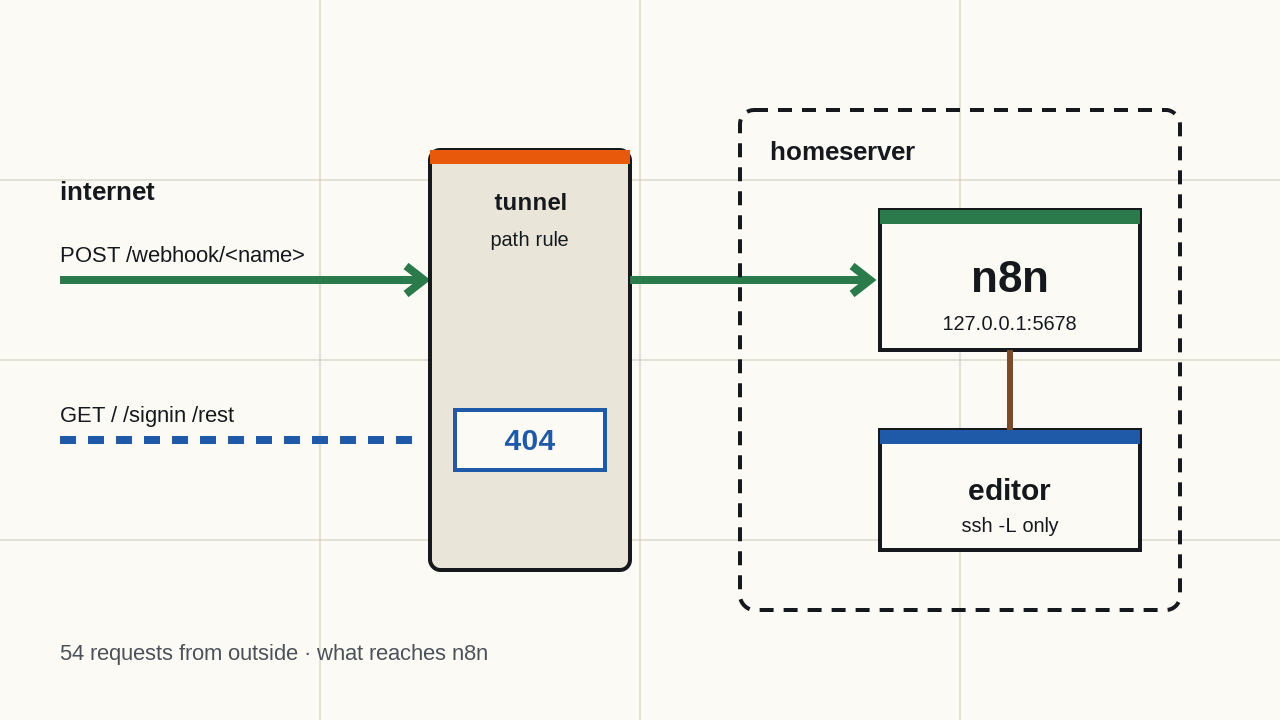
n8n behind Cloudflare Tunnel with one path rule: webhook paths go to n8n, everything else gets 404 from the tunnel, the editor opens through SSH. 54 requests from outside show what the rule stops and what still gets through. Checked on a test VM with a test n8n and a real tunnel.
- Format
- PDF EN + RU, 20 pages
- Files
- config.yml, unit file, path check script
- Stack
- n8n 2.25.6 · cloudflared 2026.10.5
- Lab
- Debian 13.7, test VMs, test n8n, real tunnel
n8n has to accept webhooks from the internet. Its editor does not have to be on the internet. In this case I publish n8n through Cloudflare Tunnel with one path rule: requests that look like a webhook go to n8n, everything else gets 404 from the tunnel. I open the editor through an SSH tunnel from a laptop. Then I try to get past the rule from outside with 54 requests and record what reached n8n.
What you get
- Through the tunnel, the editor and its API are not served. With the final rule,
/,/signin,/rest/...,/assets/...and/healthznever reached n8n. - The webhook requires a secret header.
- The n8n login can use two-factor authentication.
- A script that repeats 48 of the 54 checks against your own address, to run again after every update of cloudflared or n8n.
What you do not get
- The rule cannot stop everything. A percent-encoded path such as
/%77ebhook/<name>still returns the HTML shell of the editor: the page without its scripts. It shows at least the n8n version. The editor does not work from it, because its scripts and API stay behind 404. But anyone can see that n8n is there, and which version. The case explains why a path rule cannot close this. - If the editor was published before, Cloudflare may keep serving its main script from its cache for up to a day, even with the tunnel stopped. The page and the API are not cached.
- The path rule does not replace a secret on the webhook. Anyone who knows or guesses the webhook name can still call it.
- The rule closes more than the editor: the Wait node, Form Trigger, chat triggers and MCP stop working from outside. The case shows where to add rules for them, but these rules were not tested.
What’s inside
The case has three parts. Part A checks what your tunnel publishes now and changes nothing. Part B changes an existing tunnel to the path rule, with a backup and a way back. Part C is what I tested on a tunnel built from scratch, with the commands and the real output. It is not for a tunnel in use: it overwrites config.yml and deletes everything at the end.
The environment: test virtual machines, a test n8n, a real tunnel. The text marks what was checked, what was not verified, and what is taken from the documentation. Everything not verified is also collected in one list.
What’s in the archive
- PDF in English and Russian;
docker-compose.ymlandenv.example– the test n8n with PostgreSQL;config.yml– the tunnel config with the path rule;cloudflared.service– the systemd unit;ncp-test.json– the test workflow, without credentials;check-paths.shandncp-paths.txt– the path checks from outside;commands.txt– all commands from the text, by section.
Who it is for
- Those who already run n8n behind a locally managed Cloudflare Tunnel and want to accept webhooks from outside without publishing the editor. The previous case: n8n with PostgreSQL in Docker Compose.
- You need in advance: a server with Docker, a domain in Cloudflare, and a second device for checks from outside.
- Tested on Debian 13. Not tested on Ubuntu or other systems.
Not included
- Cloudflare Access (Zero Trust).
- Monitoring.
- Protection of webhooks against guessing, rate limiting, DDoS.
- Protection against bots (WAF, Bot Fight Mode and the like).
- Changes to the Cloudflare zone settings (URL normalization, WAF rules).
- Moving this to a production server: the steps are the same, but they were not carried out in the case.
New to Linux? The practice lab prepares you for the case studies: 12 short tasks checked on Debian 13.
See also: A Debian server at home: what is closed, what is open and n8n with PostgreSQL in Docker Compose.
What the case study covers
1-4. Task, conditions, options and the solution
What the case has to achieve, the versions, why not publish all of n8n or add a reverse proxy, and the diagram: a path rule in cloudflared, the editor through SSH.
5. Part A. Check what your tunnel publishes now
Commands that only read: the service, its config.yml, and a check from outside of /, /signin, /rest, /assets and /healthz.
6. Part B. Change an existing tunnel
A backup of config.yml, the new ingress rules, ingress validate, a restart, a check from outside, purging the Cloudflare cache for /assets/, and the way back.
7.1-7.3. Part C. A test n8n, the tunnel and the webhook address
The owner created before anything is published, cloudflared with a config that answers 404 to everything at first start, WEBHOOK_URL and N8N_PROXY_HOPS.
7.4. The path rule and attempts to get past it
54 requests from outside with percent-encoding, double slashes, ../ segments and letter case, tcpdump on 127.0.0.1:5678, and why a path rule cannot close the editor's HTML shell.
7.5-7.7. The editor through SSH, a webhook secret, 2FA
ssh -L to localhost:5678, Header Auth on the Webhook node (403 without the header, 200 with it), two-factor login in n8n and n8n mfa:disable.
7.8-7.9. Failures and removing the test tunnel
What 502 and 530 / 1033 mean, a reboot, and the order of removing the tunnel, the DNS name, cert.pem and its token.
8-12. What went wrong, the result, risks, checklist
Seven problems from the runs, the results, 26 items on what can go wrong, everything not verified in one list, and a checklist.
13. Appendix: files
docker-compose.yml, config.yml, cloudflared.service, the test workflow and the path check script.